Using an API Token
Once an administrator has issued you an API Token, you can call the JAMS REST API with it instead of signing in interactively.
For how tokens are issued and managed, see API Tokens.
Authenticating a request
A token looks like this: jams_{id}_{secret}
Send it as a bearer credential in the Authorization header of each request:
Authorization: Bearer jams_{id}_{secret}
Send the whole value, including the jams_ prefix and both underscores. No sign-in call, no token exchange, and no session handling is needed. Unlike an interactive Swagger authorization, which lasts 15 minutes, an API Token remains valid until it expires or is revoked.
A token is a credential. Store it the way you would store the password of the user it runs as. Anything holding the token can do everything that user can do through the REST API.
What a token can do
A token's access is exactly its Run As user's access. Any request made with it is evaluated against that user's permissions, Access Control Lists, and group memberships, exactly as if that person had signed in and made the call.
Please Note:
- A token bound to a standard user is limited to what that user can do. A call to an endpoint that user's ACLs deny is refused, even though the token itself is valid.
- Permission changes take effect immediately. Nothing is cached. If the Run As user gains or loses access, the token reflects it on its very next request.
- A token bound to root or to an Admin Bypass Group member has administrator-grade access. The token is not privileged in itself; it inherits whatever the account has.
What a token cannot do
A token cannot manage API Tokens. Every API Token management endpoint refuses a token-authenticated request. A token that leaks therefore cannot be used to create further tokens or to tamper with existing ones.
A token is only accepted by the REST API. Presenting one to the JAMS MCP server or to JAX is refused.
Authorizing on the Swagger page
The Swagger page can authorize with either an interactive sign-in or an API Token.
- Go to the Swagger page.
- From the definition dropdown, select the entry ending in (System API Token), for example JAMS API V1 (System API Token).
- Click Authorize.
- In the SystemApiToken field, paste the full token value,
jams_{id}_{secret}. Do not type Bearer in front of it; that is added for you. - Click Authorize, then Close.
Requests you execute from the page are now evaluated as the token's Run As user.
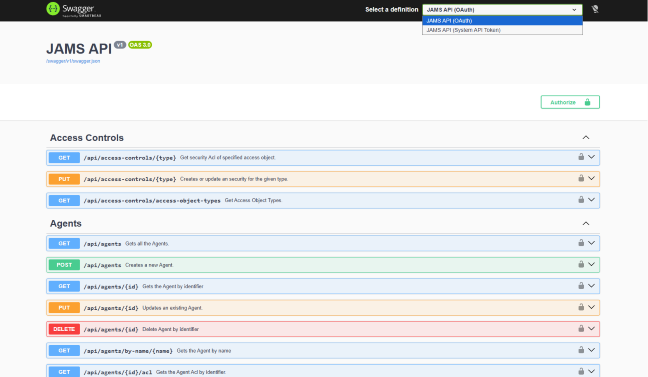
Only one method can be active at a time. Selecting a different entry from the dropdown reloads the definition and clears any authorization already in place, so you cannot be signed in with OAuth and a token simultaneously.
Executing an API Token management endpoint while authorized with a token returns 401. To exercise those endpoints from Swagger, authorize with an (OAuth) definition as a user permitted to manage tokens.
The bindable-users endpoint returns only users from the caller's own federation or identity provider, and for an identity provider only those whose external identifier is in a full security identifier form. Called as root it returns nothing.
Attribution in JAMS
Actions taken with a token are attributed to the Run As user together with the token that performed them, in the following form:
{username} (token {id})
For example, jsmith (token 7). This appears in the Audit Trail, in Created By and Last Changed By fields, and in concurrency messages. It means a token's activity can always be told apart from that user's own interactive work, and the exact token responsible can be identified even when a user has several.
When a request is refused
A rejected token-authenticated request returns an empty 401.
Any of the following produces 401:
- The token value is malformed.
- The secret is wrong.
- The token has been revoked, has expired, or has been deleted.
- The token has been regenerated, and the value being sent is no longer valid.
- The token's Run As user no longer exists.
- The token was created under a different hash key than the one the server is now using, which happens after a reinstall. See Managing API Tokens.
- The token is being presented to an API Token management endpoint, to the MCP server, or to JAX.
A 403 means the token authenticated successfully, but its Run As user is not permitted to do what was asked. Check that user's ACLs.
Because the 401 is deliberately uninformative, diagnosing one means looking at the JAMS API log on the server, which records the reason. Every request that authenticates successfully is also recorded, attributed to the token that made it.
The shipped logging level records only errors, which is enough to see a hash key mismatch but not every rejection reason. To investigate a token problem fully, an administrator may need to raise the JAMS API's logging level temporarily, reproduce the failure, then set the level back.